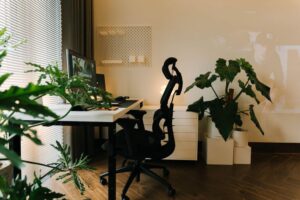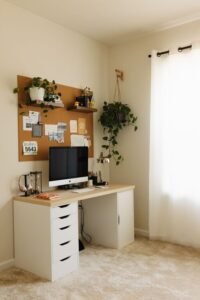

Creating a home workspace that is both cozy and productive can transform your work-from-home experience. Whether you’re working remotely full-time or just need a dedicated area to handle tasks, having a comfortable and efficient setup helps improve focus and motivation. Here are some practical tips to create a space where you enjoy spending time while staying on top of your work.
Choose the Right Location
Your workspace should be in a spot that minimizes distractions and noise. Ideally, pick a quiet corner or a spare room that allows privacy. If space is limited, look for an area with good natural light near a window. Having a dedicated space—even a small one—helps mentally separate work time from relaxation.
Invest in Comfortable Furniture
Comfort plays a key role in productivity. A good office chair with ergonomic support can prevent back pain during long working hours. Pair it with an adjustable desk or table at the right height to maintain good posture. If possible, consider sit-stand desks that let you alternate between sitting and standing.
Optimize Lighting
Lighting affects your mood and energy levels. Natural light is best for reducing eye strain and improving alertness. Position your desk near windows, but use blinds or curtains to avoid glare on your screen. Supplement natural light with adjustable desk lamps to brighten your workspace during darker hours.
Keep Your Space Organized
A clutter-free environment can boost concentration. Use organizers, shelves, or storage bins to keep office supplies neatly arranged. Clear your desktop after each day to start fresh tomorrow. Labeling storage areas helps you quickly locate items and maintain order.
Personalize Your Workspace
Adding personal touches makes your workspace inviting and motivating. Hang artwork or photos that inspire you. Use plants to bring in greenery and improve air quality. Choose cozy elements like a soft rug, cushions, or a blanket to make the environment pleasant.
Minimize Distractions
To stay productive, reduce potential interruptions. Turn off non-essential notifications on your devices. Use noise-cancelling headphones or play background music if it helps you focus. Inform family or roommates about your work schedule to create boundaries.
Use Technology Wisely
Equip your workspace with reliable technology. A fast internet connection, a quality headset for calls, and multiple monitors can improve efficiency. Keep cables organized with clips or sleeves to avoid tangling. Regularly update software and security settings for smooth performance.
Incorporate Break Areas
Even in a small home workspace, try to designate an area for short breaks. Stretching or stepping away from your desk refreshes your mind. Consider a comfortable chair or a standing spot with a view, helping you recharge during the day.
Maintain Good Air Quality
Fresh air supports focus and well-being. Open windows regularly to ventilate your workspace. Adding air-purifying plants like spider plants or peace lilies can improve air quality and add a touch of nature.
Set a Routine
Establishing a daily routine supports productivity. Set consistent start and end times for your workday. Plan tasks in advance and prioritize your to-do list. Taking scheduled breaks and respecting your work hours helps maintain a healthy work-life balance.
—
By combining comfort with organization and good habits, you can create a home workspace that encourages both coziness and productivity. Tailor these tips to your lifestyle and preferences to design a space where you feel focused, motivated, and comfortable every day.