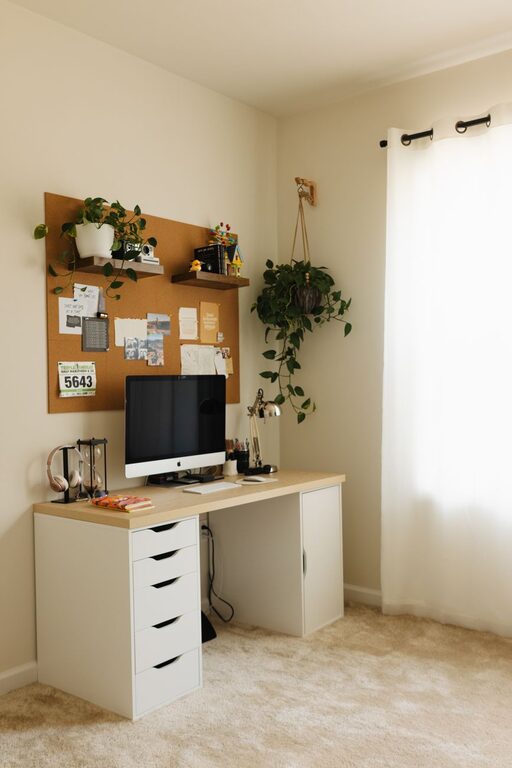
Creating a cozy and functional home workspace is essential for anyone working remotely or spending a significant amount of time at home. A well-designed area not only boosts productivity but also promotes comfort and reduces stress. Here are some helpful tips to design a home workspace that feels both welcoming and practical.
Choose the Right Location
The first step in creating a cozy workspace is selecting the best spot in your home. Consider these factors:
– Natural Light: Position your desk near a window to benefit from daylight, which can improve mood and focus.
– Privacy: Choose a quiet corner or room where interruptions are minimal.
– Space: Ensure there’s enough area for your desk, chair, and any equipment you need.
– Ventilation: Good airflow keeps the space fresh and comfortable.
If space is limited, even a small nook or a corner of the living room can become a dedicated workspace with the right setup.
Invest in Comfortable Furniture
Your workspace furniture plays a vital role in both comfort and productivity.
– Ergonomic Chair: A supportive chair reduces back and neck strain. Look for adjustable features to fit your posture.
– Appropriate Desk: Choose a desk that fits your work style and space. Consider standing desks or adjustable ones to vary your position.
– Footrest: If your feet don’t rest flat on the floor, a footrest can improve comfort.
Comfortable furniture helps you stay focused longer and prevents discomfort-related breaks.
Organize for Efficiency
A clutter-free environment supports clearer thinking and reduces distractions.
Declutter Regularly
Set aside a few minutes at the end of each day to tidy up. Remove unnecessary papers, organize cables, and put away unused items.
Use Storage Solutions
– Shelves: Keep books, supplies, and decor off the desk.
– Drawers and Boxes: Store stationery and documents neatly.
– Cable Management: Use clips or organizers to avoid tangled wires.
Keeping essentials within reach while stowing away extras creates a balanced and efficient workspace.
Personalize Your Space
Adding personal touches makes the area feel inviting and motivates you to spend time there.
– Plants: Indoor plants improve air quality and bring a touch of nature.
– Artwork or Photos: Display images that inspire or bring joy.
– Decorative Items: Use tasteful items like candles, lamps, or colorful cushions—but avoid overcrowding.
Personalized spaces boost mood without distracting from work.
Optimize Lighting
Good lighting reduces eye strain and keeps energy levels up.
– Layer Your Lighting: Use a combination of ambient, task, and accent lighting.
– Desk Lamp: A focused light source helps with reading and detailed tasks.
– Avoid Glare: Position screens perpendicular to windows to minimize reflections.
Adjust your lighting throughout the day to maintain comfort and productivity.
Manage Technology Wisely
Setting up your technology correctly helps streamline work and prevent frustration.
– Reliable Internet: Ensure a strong Wi-Fi connection or use an ethernet cable for stability.
– Necessary Devices: Have the right computer, mouse, keyboard, and accessories tailored to your work.
– Backup Tools: Use external drives or cloud services to protect important files.
– Limit Distractions: Turn off notifications unrelated to work during focus times.
Maintaining an organized digital workspace complements your physical setup.
Establish Boundaries
Especially when working from home, setting physical and mental boundaries improves work-life balance.
– Dedicated Work Hours: Stick to a schedule to separate work and personal time.
– Visual Cues: Close a door or use a screen to delineate workspace.
– Communicate: Let family or housemates know your work hours to minimize interruptions.
Boundaries help maintain focus and preserve relaxation after work.
Add Comfort Features
Small comforts make a big difference during long workdays.
– Soft Rug: A rug adds warmth and can reduce noise.
– Heating or Cooling: A fan, space heater, or window can help regulate temperature.
– Water and Snacks: Keep a bottle of water and healthy snacks at hand to stay refreshed.
Comfortable touches create an inviting atmosphere that encourages productivity.
—
By thoughtfully designing your home workspace with these tips, you can create an environment that supports productivity and well-being. Remember, your workspace should evolve with your needs, so feel free to make adjustments over time to keep it cozy and functional.